Lightbox popup your visitors cannot miss
Pop-up lightbox to turbo-charge lead growth
With a pop-up light box, visitors won't miss your message. Fully customize it according to a website or mobile pop-ups design, and watch this welcome message converting your visitors into clients. Increase sales conversion, encourage registrations, and reach your goals with only one tool.
7 days of free trial.
No credit card required

How to build a welcome popup in the editor
How to build a lightbox pop-up
Once you open the Dashly editor, go to "Triggered message". Press "Create message", choose Pop-up builder and select the size of your message:
- 1
Choose the pop-up type
Big pop-up lightbox is shown in the center of the screen and blocks other objects.
Small pop-up lightbox takes only a part of the screen and is less distracting.

- 2
Pick the blocks
Customize them and see changes appear on the preview screen on the right. Blocks can be activated and deactivated while you're experimenting with your lightbox in the pop-up creator. To quit the edit mode, press a dash.

- 3
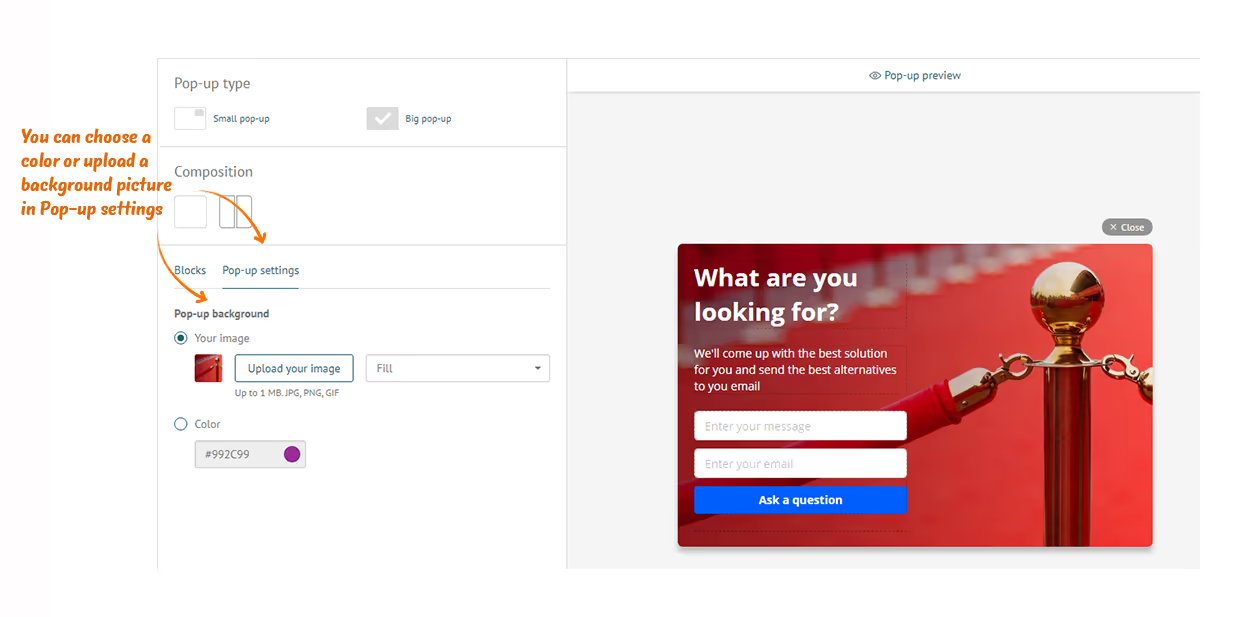
Choose background
Go to the settings and upload the background image or select a color. Choose how to lay the image.
- 4
Edit image
Choose dimensions and layout. Want to animate your message? Our pop-up software allows inserting video files.

- 5
Add buttons
Use as many buttons as you need and select events: lead viewers to your website, abandoned cart, registration page, etc.

- 6
Set up audience and triggers
When do you want the pop-up window to appear? Define the list of actions (events) page visitors perform to trigger the appearance of your banner. After that, you can apply segment filters in Dashly builder, as well as Properties, Events and Tags. Better audience targeting yields better results.

What are you waiting for? Sign up in Dashly to create your first lightbox
Welcome popup scenarios, and five more
Pop-up light box scenarios: One tool for all goals


What lightbox popups did for these teams
Recipes for your company growth with Dashly pop-up lightboxes

+25%new signups
How to bring more visitors to sign up? Dashly and IQ Option answered this question and got 25% more sign ups. The story of ups and downs, different A/B tests and a happy end for trade stocks and digital options platform.
Read the success story
3Xleads within 6 months
How to generate more leads?
Dashly and Findthat.email know the answer. The story of how the implementation of one product brought 3 times more leads with one pop-up and a live chat.
Read the success story
+55%sales
How to get more online sales?
Dashly and Kflwebdesign made a cool project for a New York flower shop that brought more leads, improved customer service and helped the flower shop to get 55% more online sales.
Read the success story
What you get with the Dashly lightbox popup
Advantages of pop-up lightbox
Dashly presents an easy-to-use tool for you to enjoy unmatchable flexibility and create attention-grabbing messages. What makes it the ultimate solution for banners?
A wealth of ready pop-up templates.
A wealth of ready pop-up templates. Enjoy full customization and create a lightbox in a matter of a few minutes.
Visual editor.
Visual editor. Change any design element: text, background, image, dimensions, video, and buttons. Navigation is intuitive - you don't need pop-up building experience.
Flexible settings.
Flexible settings. Choose who and when will see your message. Set display time and trigger events, categorize target audiences, and see your banners' conversion grow.
Unlimited users.
Unlimited users. Dashly allows you to collaborate in the automation platform over every pop-up light box together with as many teammates as you need.


Lightbox popup FAQ
This is a pop-up window that opens every time a visitor opens your website or mobile application. It includes an advertisement or a message with a call to action: registration, purchase, email submission, and so on. This is one of the most efficient tools for converting viewers into customers.
All you need is to sign up in Dashly. Proceed to the lightbox pop-up builder: the visual editor has convenient functionality for customizing buttons, uploading images or videos, and adding any essential elements. Navigation is a no-brainer.
Lightbox building is available in all Dashly versions, including a free 7-day trial.
Not at all. Our intuitive visual editor features all necessary tools and blocks for you to set up a scenario, customize ready lightbox templates and add elements. Your perfect banner will be ready within 15 minutes.