
How to build an exit popup, step by step
A step-by-step guide to creating an exit intent pop-up
With Dashly pop-up software, you can create free exit intent pop-ups in no time. It is easy to change and adjust it to suit, saving more visitors and driving more conversions!
- 1
Decide what the popup should do
Decide on the goal of a pop-up
Even inside your exit intent pop-up, you have various goals and intended actions to choose from — from email list subscriptions to special promos. Thankfully, there are already heaps of pre-designed and easy-to-customize pop-up templates to pick from.

- 2
Customize it in the visual editor
Customize a template or build a new one
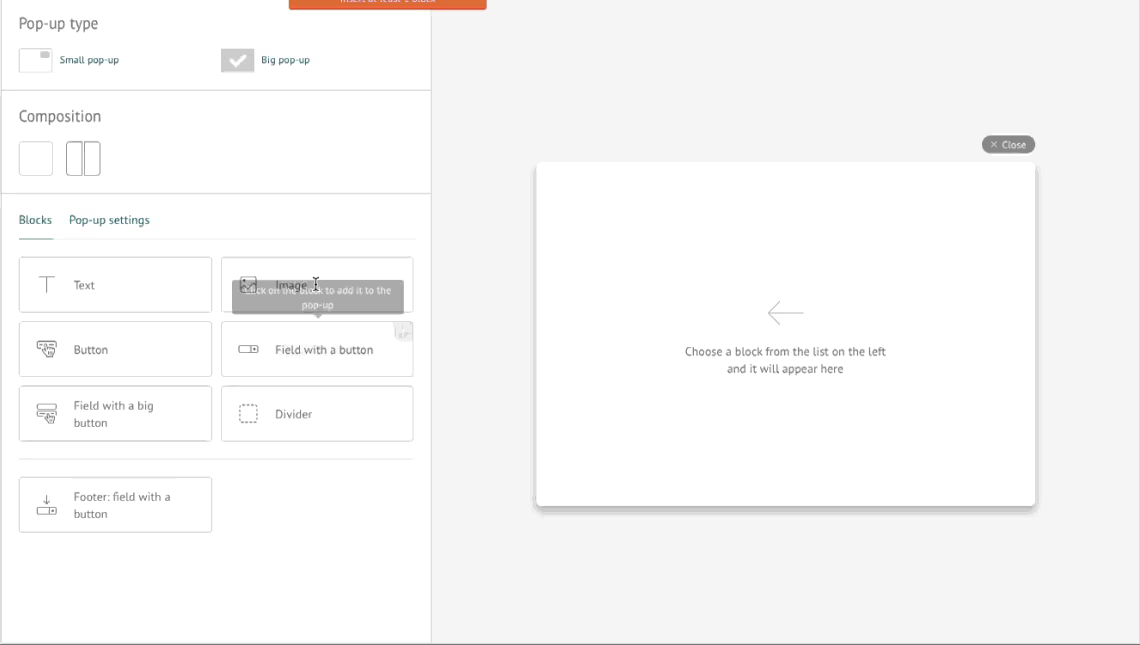
Visual editor blocks will take you minutes to customize your template or create a new one with no coding required.
Depending on your goals, you can add and adjust the size of images, videos, fields for email addresses and phone numbers, buttons, background, and other elements.
- 3
Set the exit trigger and the segment
Set up scenarios, triggers, and segments
Choose trigger events that set off an exit intent pop-up, define site pages, audiences and apply segment filters to them to show your pop-ups to specific groups of visitors.

- 4
Test two versions against each other
Launch A/B tests
With A/B tests, you can evaluate what messages, designs and offers work best for your audiences. Test, improve and hit the target with the most effective version of your free exit intent pop-up.

- 5
Watch how it performs
Analyze your pop-up performance
Use visual stats to access your exit intent pop-up performance. Based on this data, you can easily polish your exit intent pop-ups to enhance their effectiveness.


Ready-made exit intent popup scenarios
Ready-to-use exit intent pop-up scenarios


The biggest businesses fear is that pop-ups will annoy website visitors. But don't worry — Dashly exit intent pop-ups are a game-changer. All solutions are behavior-based and well-tested so that you can be sure they'll have a good chance of success.
What exit popups did for these teams
Recipes for your company growth with Dashly exit intent pop-ups

+25%new signups
How to bring more visitors to sign up? Dashly and IQ Option answered this question and got 25% more sign ups. The story of ups and downs, different A/B tests and a happy end for trade stocks and digital options platform.
Read the success story
3Xleads within 6 months
How to generate more leads?
Dashly and Findthat.email know the answer. The story of how the implementation of one product brought 3 times more leads with one pop-up and a live chat.
Read the success story
+55%sales
How to get more online sales?
Dashly and Kflwebdesign made a cool project for a New York flower shop that brought more leads, improved customer service and helped the flower shop to get 55% more online sales.
Read the success story
Why teams pick Dashly for exit intent popups
Why do I choose Dashly exit intent pop-ups?
Dashly presents an easy-to-use tool for you to enjoy unmatchable flexibility and create attention-grabbing messages. What makes it the ultimate solution for banners?
A mix-match of design options.
You can build your exit intent pop-up from scratch or customize any element from pre-designed templates — texts, fonts, buttons, colors, contact fields, and more!
No coding required.
No designer or programmers in your team? That's not a problem — with an easy-to-use visual editor, you can build your first free exit intent pop-up with no tech specialists required!
Flexible settings.
Determine and segment audiences, customize trigger events, and configure the right time and place when the exit intent pop-up appears on the website.
Unlimited seats.
No matter how big your team is, with Dashly pop-up creator, you can always be sure that none of your team members will be left out, so you can work on your pop-ups together.


Exit intent popup FAQ
An exit pop-up is a message shown to a website visitor that clicks on a "leave button". Their primary purpose is to stop visitors from leaving by offering them to take additional actions. Usually, joining your email list, offering a discount — whatever your goal is.
Spoiler: Yes. Surprised? Well, you shouldn't be! First, they don't interrupt users' experiences. Second, based entirely on users' previous interactions with your website, they add value to it — offering a discount (if they abandon their cart) or email subscription (if they were reading your blog posts).
No, coding skills are not required, nor do you need a designer. With our pre-designed templates and easy-to-use visual editor, you can build your first exit intent pop-up in no more than 15 minutes, even if you've never done this before.